Following are the Tips to thoroughly check a secondhand or used cell phone before buying,I have learned these from Hafeez Center and Hall Road Vendors
1. Check the accessories that comes with the phone,verify that which accessories comes with the new one and if any thing is missing ask the seller about it.
2. Check the original body of the phone(specially if its Nokia).
3. Check the seal of the warranty even if the cell's waranty expired.
4. If phone is in warranty match the IMEI number of the warranty card and the phone, usually printed on the back side of phone under the battery.
5. Check the incoming and outgoing voice with and without handsfree.
6. Check the volume of the rigtone speaker.
7. Check LCD contrast.
8. Always Make a real call from the phone and verify the incoming and outgoing voice.
9. Attach the charger and charge the phone for 5 mins
10. Thoroughly check the menu play with the phone,turn it On and OFF couple of times.
11. Remove the battery for couple of minutes and reinstall it again to verify the health of the battery.
12. Ask the seller why he wants to sell, is there any problem with the cell(Even if cell looks like a new one).
13. If a locallly used 1 or more than one year old cell phone looks like a brand new one ,check it more carefully,its may be painted.
14. To check wether the phone is painted or not, carefully examine the edges of screen ,the speaker and mic place you will defintly find some evidence of spray paint.one more thing if the surface of the phone is a little bit rough or grainy slightly scratch the phone's paint with your nail ,if its painted the pain will be removed.
15. Always check the bluetooth and gallery. Try to open it (gallery) and turn it on (bluetooth).
16. To verify wether its repaired or not.
- Check the warranty seal.
- Examine the all Screws very carefully if a little bit paint is removed or all the screws are not alike then the set is opened.
- See the edges of the phone,the line between the upper and lower halves of the body. Press phone slightly if there is a little bit play between the upper and lower half then the set is may be repaired.
one more thing those vendors check ,i:e they blow into the mic of the phone I am not sure what they check ,if anyone else know then he is welcome to shed some light on it.
thats all I have on my mind right now, may be a few things more later.till then
Default secret iPhone codes
*3001#12345#* and tap Call. Enter Field Mode.Field mode reveals many of the inner settings of your iPhone, specifically up-to-date network and cell information.
*#06# Displays your IMEI. No need to tap Call.IMEI is the unique identifier for your cell phone hardware. Together with your SIM information it identifies you to the provider network.
*777# and tap Call. Account balance for prepaid iPhone.
*225# and tap Call. Bill Balance. (Postpaid only)
*646# and tap Call. Check minutes. (Postpaid only)These three are pretty self explanatory.
*#21# and tap Call. Setting interrogation for call forwards.Discover the settings for your call forwarding. You'll see whether you have voice, data, fax, sms, sync, async, packet access, and pad access call forwarding enabled or disabled.
*#30# and tap Call. Calling line presentation check.This displays whether you have enabled or disabled the presentation of the calling line, presumably the number of the party placing the call.
*#76# and tap Call. Check whether the connected line presentation is enabled or not.State whether the connected line presentation is enabled or disabled. Presumably similar to the calling line presentation.
*#43# and tap Call. Determine if call waiting is enabled.Displays call waiting status for voice, data, fax, sms, sync data, async data, packet access and pad access. Each item is either enabled or disabled.
*#61# and tap Call. Check the number for unanswered calls.Show the number for voice call forwarding when a call is unanswered. Also show the options for data, fax, sms, sync, async, packet access and pad access.
*#62# and tap Call. Check the number for call forwarding if no service is available.Just like the previous, except for no-service rather than no-answer situations.
*#67# and tap Call. Check the number for call forwarding when the iPhone is busy.And again, but for when the iPhone is busy.
*#33# and tap Call. Check for call control bars.Check all the usual suspects (voice, data, fax, sms, etc) to see whether barring is enabled or disabled for outgoing.
Billions of people watch YouTube videos on-line every day.But only a few of them can enjoy YouTube videos on their iPod/PSP/iPhone/Zune/Mobile phone .
Most people often have difficulties in downloading videos from YouTube and converting them to the playable formats supported by iPod/PSP/iPhone.
Now all has gone. youtube is born for the solution of the questions above.
With it you can download, convert and put videos from YouTube on your iPod/PSP/iPhone/Zune/Mobile phone easily by taking the steps as follows.
Make preparations:
1 : Download and install youtube mate
2 : Download YouTube videos.
Click the “download” button. A dialog pops up and put the video URL in the “video URL” text.
Finally click “OK” button. In a short while the video will be downloaded.
Part 1: Convert downloaded videos
(1) For iPod/ iPhone/Zune/Mobile phone
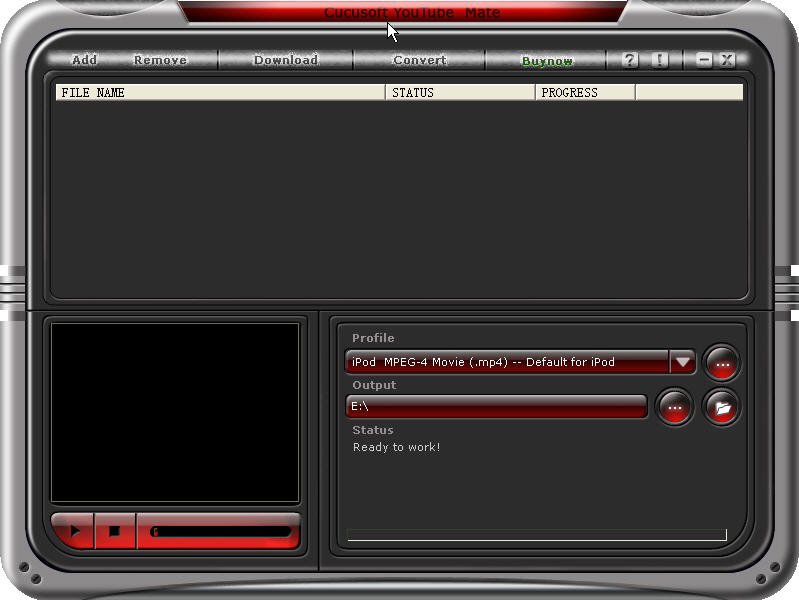
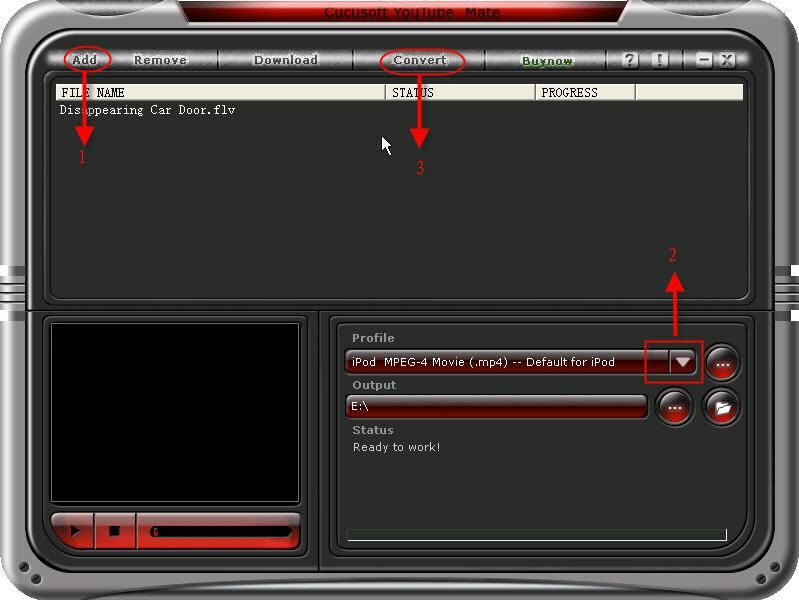
Step 1: Click the “Add” button and select the downloaded videos and Select the iPod MPEG-4 Movie for iPod or iPhone MPEG-4/H.264 Movie for iPhone from the “profile” drop-down list. In addition you can also select the formats for Zune and Mobile phone from the drop-down list.
Step 2:Click the “…”button to select the output of your videos and then click the “convert” button to start the conversion. In a short while it will be finished.
(2) For PSP
You need a special converter to convert the downloaded videos to the PSP playable videos. You can take the following steps.
Step 1:Download and install iSkysoft Video Converter
Step 2: Run the software and click “Add files” button to load videos.
Step 3: Choose PSP formats from drop-down list.
Step 4: Select the destination of video from the output drop-down list and click “Convert” button to start the conversion.
Part 2: Put the videos on iPod/PSP/iPhone .
(1) For iPod/iPhone
You can upload the videos to the iTunes and then put it onto your iPod/iPhone.
(2) For PSP
You should create a new file named MP_ROOT under the root directory and then create a file named 100MNV01 under the MP_ROOT file. Put your video in the 100MNV01 files and you can enjoy your video on PSP.
Now you can enjoy any videos downloaded from YouTube on your iPod/PSP/iPhone. Have fun!



Ever dropped your cell phone in the sink, or even worse, the toilet? Did you ever leave it in your pocket and run it through the washer? Did you ever swim with your cell phone in your pocket? It usually means you have to replace your phone, but sometimes if you're fast, you can save the phone!
Lets we solve this problem
- Get it out of the water as soon as possible. The plastic covers on cell phones are fairly tight, but water can enter the phone in a short period of time, perhaps only 20 seconds or less. So grab your phone quickly! If you can't get to it in time, your best bet is to remove the battery while it is still under water. Water helps dissipate heat from shorts that can damage the phone, so most damage occurs when the inside of the phone is merely wet and there is a power source.
- Remove the battery. This is one of the most important steps. Don't waste the time to think about it; electricity and water do not mix. Cutting power to your phone is a crucial first step in saving it. Many circuits inside the phone will survive immersion in water provided they are not attached to a power source when wet.
- Remove your SIM card. Some or all of your valuable contacts (along with other data) could be stored on your SIM. To some people this could be more worth saving than the phone itself. SIM cards survive water damage well, but some of the following steps are unnecessary i.e. don't heat it. Just pat it dry and leave it aside until you need to connect your phone to your cellular network. (This step does not apply to CDMA carriers such as Verizon, Alltel, US Cellular, Sprint, etc.)
- Dry your phone. Obviously you need to remove as much of the water as soon as possible, so you can save it from getting into the phone. Shake it out without dropping it, then use a towel or paper towel to gently remove as much of the remaining water as possible. Dry the excess moisture by hand.
- Remove any covers and external connectors to open up as many gaps, slots, and crevices in the phone as possible.
- Use a vacuum if possible. Do not use a hair dryer (even on a "cold" mode) to dry out the phone, as this may force moisture further into the small components, deep inside the phone. If moisture is driven deeper inside, corrosion and oxidation may result when minerals from liquids are deposited on the circuitry. Using a hairdryer might be a temporary fix, but this will eventually cause component failure inside the phone. Instead, remove all residual moisture by drawing it away with a vacuum cleaner held over the affected areas for up to 20 minutes in each accessible area. This is the fastest method and can completely dry out your phone and get it working in thirty minutes. Be careful not to hold the vacuum too close to the phone, as a vacuum can create static electricity, which is even worse.
- Use a substance with a high affinity for water to help draw out moisture. Leave the phone in a bowl or bag of uncooked rice overnight. The rice would absorb any remaining moisture. If available, it is preferable to use desiccant instead. Desiccant will absorb moisture better than rice. It may be found under a brand name such as "Damp Rid" or "Dry Right".
- Let the phone sit on absorbent towels, napkin, or other paper. Check the absorbent material every hour for 4 to 6 hours. If moisture is evident, repeat the vacuuming step and desiccant steps.
- Test your phone. After you have waited a day or so, make sure everything is clean and dry looking and re-attach the battery to the phone and see if it works. If your phone does not work, try plugging it into its charger without the battery, if this works, you need a new battery. If not, try taking your cell phone to an authorized dealer. Sometimes they can fix it. Don't try to hide the fact that it has been wet. There are internal indicators that prove moisture.
To find out if the phone is truly water damaged, remove that battery. In the corner near where the battery is, there SHOULD be a white square or circle, with or without red lines. If this is pink or red, your phone does in fact have water damage.
About Me

