
U will get series 80 applications here.
Series 80 phones are 9250,9500,9290 communicator,9300
Adobe Reader
Adobe Reader for s80 phones.
antivirus for the phone
task manager for s80
messenger for s80 which has yahoo,gmail,and many more
mobipocket reader for ebooks
oggplay mmf music player to play .ogg songs
put a number of alarm using this and many more
Download
Mobile Master Corporate 7.2.4 Build 2954 - 16 MB
Supported OS: Windows Vista, XP, 2000
Mobile Master is a Cell phone and handset manager for Windows and synchronizes with a few mouse clicks your contacts and appointments between the handset and your computer. Edit and synchronize calendar entries (appointments and tasks).
Send, read, archive SMS Note: the SMS Servant is included in the Mobile Master installation but requires an extra license. Logo-Editor, modify ring tone. Copy Station for transmitting your address book easily from one phone to the other. Mobile Master Agent: reach always the important functions easily and start e.g. Mobile Master automatically as soon as your mobile phone is connected to the PC.
Features:
* One click synchronization solution for your mobile phone, edit all you phones data with the computer. Synchronization of contacts and the calendar, Many filter possibilities, AddIns for Outlook, Lotus Notes, Palm Desktop and Thunderbird
* Mobile Master synchronizes or just copies all data with/to your mobile phone.
Synchronize with: Outlook, Lotus Notes, Novell Groupwise, Palm Desktop, Thunderbird, Tobit David, Eudora, The Bat, Outlook Express, Google calendar, Windows contacts and calendar, iTunes
* new cell phone: Mobile Master copies the phone/address book from your old to your new one regardless the manufacturer of the phones new phone number, appointment or note: type it in with your PC and send it easily to the cell phone.
* Many import and export filters, e.g. one click to export to excel or open office. Can import e.g. vcf file with more than one contact and that has unicode format
* Connection with the phone: serial or USB cable, infrared or Bluetooth, up to COM Port 300 supported.
Features:
- Mobile Master is a handset manager to edit manually or synchronize automatically or on demand
- Quick area for quick and easy access to the main functions
- Comfortable editing of the phone book, calendar and note items
- easy to use user interface
- Setup Wizard for easy configuring
- Copy files, >music, photos
- SMS send, archive
- Copy the address book, calendar from one phone to another
- At least one update per month for the phones and devices
- Copy play lists from iTunes and WinAmp to the phone
Supported mobile phones and devices:
- Apple iPod:iPod Video, iPod nano
- LG: KG800 Chocolate, KG320S
- Motorola: RAZR V3r, RAZR V3i, SLVR L7, SLVR L6
- Nokia: Nokia 6233, Nokia 6270, Nokia 6280, Nokia 6230, Nokia 6230i, Nokia 6220, Nokia 6210, Nokia 6200, Nokia 6100, Nokia 6310, Nokia 6310i, Nokia 6820, Nokia 6822
- Sony Ericsson: W880i W880 W710i W710 Z710i Z710 Z610i Z610 K800 K800i K800 W900i W900 W850i W850 W810i W810 W800i W800 W700i W700 W550i W550 W500i W500 W300i W300 D750i D750 K750i K750 K700i K700 K610i K610 K600i K600 K510i K510 K500i K500 K300i K300 F500i F500 S700i S700 T610i T610 V800i V800 V600i V600 Z600i Z600 Z550i Z550 Z520i Z520
- Samsung: Samsung SGH-P310, Samsung SGH-P300, Samsung SGH-D900, Samsung SGH-D830, Samsung SGH-D820, Samsung SGH-D800, Samsung SGH-D600, Samsung SGH-D520, Samsung SGH-D500, Samsung SGH-E900, Samsung SGH-E850, Samsung SGH-E800, Samsung SGH-E770, Samsung SGH-E760, Samsung SGH-E730, Samsung SGH-E720, Samsung SGH-E700, Samsung SGH-E620, Samsung SGH-E610, Samsung SGH-E570, Samsung SGH-E530, Samsung SGH-E500, Samsung SGH-E380, Samsung SGH-E370, Samsung SGH-E350, Samsung SGH-E250, Samsung SGH-X830, Samsung SGH-X820, Samsung SGH-X800, Samsung SGH-X700, Samsung SGH-X670, Samsung SGH-X660, Samsung SGH-X640
- Siemens BenQ: BenQ Siemens EL71, BenQ Siemens E61 , BenQ Siemens S88, BenQ Siemens S68, BenQ Siemens E61 , Siemens S75, Siemens SL75, Siemens CX75, Siemens CF75, Siemens C75, Siemens M75, Siemens ME75, Siemens CX70, Siemens M65, Siemens M56, Siemens S65, Siemens SL65, Siemens SK65, Siemens CX65, Siemens S56, Siemens S55, Siemens M55, Siemens SL55
and more...
Changes in Version 7.2.4 build 2954:
* New features:
o Improved 'Check for Updates'
* Fixed bugs/solved problems:
o Fixed problems with the synchronization with Thunderbird, e.g. the AddOn could not be installed automatically on Vista systems
o Fixed problems on systems with Windows XP 64 bit with 4GB Ram or more.
o Fixed endless loop displaying the log file
Homepage
Download: (Size: 16 MB)
What is Nokia Messaging?
Nokia Messaging makes mobile email easy and mobilizes consumer email across a range of Nokia Series 60 devices. Nokia Messaging supports multiple mailboxes, automatic email delivery, IMAP folders, and a wide range of email service providers and Nokia phones. Nokia Messaging enables users to quickly set up, access, and use their email on their Nokia devices through a service that is optimized for mobile email.
What's new in this release of Nokia Messaging?
Improved application performance, including rapid access to the Inbox
Support for up to 10 email addresses
Better support for subfolders in IMAP email accounts
Flagged messages automatically become starred messages in Gmail
Improved battery life
More intuitive inbox navigation
Support for more Nokia S60 phones
Support for Google Apps hosted email addresses
Mail sent from any email address on your phone now syncs to the server
How much does Nokia Messaging cost?
There is no charge for using Nokia Messaging during the trial period. In the future, consumers will be able to acquire Nokia Messaging through a wireless operator with a data plan.
You may incur third-party charges in connection with the transfer and receipt of data to your mobile phone, such as the mobile data service cost charged by your wireless operator. Your wireless operator can provide you with cost information about its mobile data service plans.
How much does the Nokia Messaging cost when I am roaming?
Because third party data transfer costs may apply, you may choose to suspend email delivery when you leave your network area to prevent unexpected charges. Sync while roaming is enabled by default. Follow the below steps if you want to suspend email delivery outside your network area.
To suspend email delivery while roaming:
Select the Edit Settings icon from the Nokia Messaging client on your Nokia phone.
Select When to Sync.
Set Sync While Roaming to Off.
Consult your wireless operator for more information about data transfer costs.
Getting Started
How do I set up Nokia Messaging on my Nokia phone?
To sign up for Nokia Messaging, you need:
An existing Internet email account
A wireless data service plan with your wireless operator
A supported Nokia phone
Nokia Messaging software installed on your Nokia phone
Click here to sign up.
Why do I have to give you my mobile number?
Your phone number is required to send your phone a text message (SMS) with a link to the Nokia Messaging software. The link in the text message lets you download and install the software directly on your phone.
Nokia does not use your mobile number except in accordance with our Service Terms and Privacy Policy.
Why do I have to give you my email password?
Nokia Messaging automatically fetches your email messages from your email account as new email arrives. To access your email, Nokia Messaging needs your user name and password.
Nokia does not use your password except in accordance with our Service Terms and Privacy Policy.
What if I am already receiving email on my phone?
Nokia Messaging can run on your Nokia phone alongside most other email solutions without any problems.
However, if you are using Nokia Intellisync Mobile Suite, you must uninstall this product before using Nokia Messaging.
To uninstall Nokia Intellisync Mobile Suite:
Select the Menu button on your Nokia phone.
Select Installations.
Highlight the Intellisync icon.
Select Options> Remove.
How am I notified of incoming email in Nokia Messaging?
When a new email arrives, you are notified with the email alert tone and/or vibration, and the @ sign appears in the menu bar. E-Series devices also display the subjects of the latest received messages on the home screen.
Can anyone intercept and read my email as it travels over the wireless network?
No. Your email is encrypted through SSL (Secure Sockets Layer) as it travels over the wireless network, to prevent unauthorized access.
Can I receive calls on my mobile phone when I am receiving email?
Yes. You can make and receive phone calls while Nokia Messaging is running.
How Do I ...
How do I add or remove IMAP folders to sync?
Log into your account on email.nokia.com.
Select the Edit settings link next to an email address for which you would like to sync additional folders. If the email account uses the IMAP protocol, you can select more folders to sync.
Select the folders you would like to sync and save your changes.
To request another SMS message with the link to the Nokia Messaging software:
Log in to your account on email.nokia.com.
Select Install now.
Enter the phone number of the Nokia phone on which you want to have Nokia Messaging. A new SMS text message is sent to the phone number you entered.
How do I add or remove an email address on email.nokia.com?
To add an email address:
Log into your account on email.nokia.com.
Under My email addresses, select Add another.
Enter the email address and password.
Select Next.
To remove an email address:
Log into your account on email.nokia.com.
Under My email addresses, select Remove for the address you want to remove.
On the next page, select Remove again.
How do I add or remove an email address on my Nokia phone?
To add an email address:
From the Email launcher screen on your device, select Options.
Select Add mailbox.
To remove an email address:
From the Email launcher screen on your device, select the Settings icon.
Scroll to the account you want to remove.
Select Options-Remove mailbox.
Select Yes.
How do I change the password to my Nokia Messaging account?
To change the password to your Nokia Messaging account:
Log in to your account on email.nokia.com.
Under My Nokia Messaging account, select Change next to Password.
Enter your old password and your new password.
Select Save password.
How do I update the password for an email address I use with Nokia Messaging?
If you change the password to an email address with your email service provider, you need to update the password in the email address settings of your Nokia Messaging account so that you continue to receive email from that address.
To change the password for an email address:
Log in to your account on email.nokia.com.
Under My email addresses, select Edit settings for the address you want to change.
On the next page, click the Change password button.
On the next page, enter the new password.
Select Save changes.
How do I stop receiving email on my mobile phone?
To temporarily stop email delivery on your phone:
Open the Email launcher screen on your device.
Select Options.
Select Offline.
Troubleshooting
I have not received the SMS message yet. What do I do?
To request another text message with the link to the Nokia Messaging software:
Log in to your account on email.nokia.com.
Select Install now.
Enter the phone number of the Nokia phone on which you want to have Nokia Messaging. A new message is sent to the phone number you entered.
If you're having trouble receiving the SMS message, you can use the Web browser on your phone to directly download the software.
On your phone's web browser, go to: http://email.nokia.mobi
Select the button to download the Nokia Messaging software.
Follow the instructions on the phone to download and install the software.
Enter your email address and password.
Select Automatic if asked how you want your mail delivered.
How far back in time can I save my email using Nokia Messaging?
You can store email messages for up to one month with Nokia Messaging. Those messages are stored in the device memory of your phone, so you may wish to change the amount of stored messages in the settings on your device.
Go to the Email launcher
Select the Settings icon.
Select What to sync.
Select Inbox.
Select Remove older than and change to desired value.
When you initially set up Nokia Messaging you will receive email from the last three days, then automatic delivery of new email will begin. Old email is stored to the value you set in the Settings menu.
Can I view HTML email in Nokia Messaging?
Nokia Messaging does not support HTML email in this release, however, we are working to bring HTML support in an upcoming release of Nokia Messaging.
My mobile phone displays an error message about not being able to connect to the Internet. What do I do?
Your access point may be incorrectly defined or your mobile phone may be out of network coverage. An access point is a setting your mobile phone uses to connect to the Internet.
Ensure that your phone is within network coverage and that your access points are correctly defined. If necessary, you can download new access points from the Settings (in the Tools folder) on your phone.
I get an error message when I try to get my email on my mobile phone in another country. What does this mean?
Nokia Messaging requires Internet connectivity. Most often this error is due to the fact that your wireless operator does not have roaming agreements with wireless operators in that country.
I am not getting email on my mobile phone any more. What do I do?
If your account is active and you are not receiving email on your mobile phone, check for the following circumstances:
You may have changed the password for your Internet service provider email address. If so, you must update the Nokia Messaging settings for this email address with your new password. Email messages will then be delivered to your phone. To update your email address password, log in to your Nokia Messaging account. Under My email addresses, select Edit settings. Click Change password, enter the new password, and then select Save changes.
The server for your email address is down. For more information, contact your email service provider.
You may have inadvertently changed a setting in your Nokia Messaging account. Log in to your account to determine whether your information needs to be updated.
My question was not answered here.
If you need help with Nokia Messaging, please visit Nokia Support and select Contact Us.
http://www.nokia.com/support
* The ringtone “Nokia Tune” is actually based on a 19th century guitar work named “Gran Valse” by Spanish musician Francisco Tárrega. The Nokia Tune was originally named “Grande Valse” on Nokia phones but was changed to “Nokia Tune” around 1998 when it became so well known that people referred to it as the “Nokia Tune.“
* The world’s first commercial GSM call was made in 1991 in Helsinki over a Nokia-supplied network, by Prime Minister of Finland Harri Holkeri, using a Nokia phone.
* Nokia is currently the world’s largest digital camera manufacturer, as the sales of its camera-equipped mobile phones have exceeded those of any conventional camera manufacture
* The “Special” tone available to users of Nokia phones when receiving SMS (text messages) is actually Morse code for “SMS“. Similarly, the “Ascending” SMS tone is Morse code for “Connecting People,” Nokia’s slogan. The “Standard” SMS tone is Morse code for “M” (Message).
* The Nokia corporate font (typeface) is the AgfaMonotype Nokia Sans font, originally designed by Eric Spiekermann. Previously in advertising and in its mobile phone User’s Guides Nokia mostly used the Agfa Rotis Sans font.
* In Asia, the digit 4 never appears in any Nokia handset model number, because 4 is considered unlucky in many parts of Southeast/East Asia.
* Nokia was listed as the 20th most admirable company worldwide in Fortune’s list of 2006 (1st in network communications, 4th non-US company).
* Unlike other modern day handsets, Nokia phones do not automatically start the call timer when the call is connected, but start it when the call is initiated. (Except for Series 60 based handsets like the Nokia 6600)
* Nokia is sometimes called aikon (Nokia backwards) by non-Nokia mobile phone users and by mobile software developers, because “aikon” is used in various SDK software packages, including Nokia’s own Symbian S60 SDK.
* The name of the town of Nokia originated from the river which flowed through the town. The river itself, Nokianvirta, was named after the old Finnish word originally meaning sable, later pine marten. A species of this small, black-furred predatory animal was once found in the region, but it is now extinct.

Supported Devices :-
Alcatel: One Touch 557, One Touch 557a, One Touch 735, One Touch 756, One Touch C550, One Touch C552, One Touch C552a, One Touch C750, One Touch S853
Amoi: 8512
Asus: P525
Audiovox: SMT 5600
BenQ: A520, C30, EF51, P50
BenQ-Siemens: CL71, E61, E71, E81, EF91, S81, S88, SL91
BlackBerry: 6220, 6230, 6280, 6720, 7100, 7100i, 7130, 7130e, 7210, 7230, 7250, 7280, 7290, 7510, 7520, 7730, 8100, 8130, 8300, 8310, 8320, 8330, 8700, 8703e, 8707, 8800, 8820, 8830, Bold 9000, Storm 9500, Storm 9530
CECT: A1000
Cingular: Cingular 2125, Cingular BlackJack
Dopod: Dopod 515, Dopod 557w, Dopod 565, Dopod 575, Dopod 585, Dopod 586w, Dopod 595, Dopod C720W
Fly: SX210
HP: iPAQ 510 Mobile Messenger
HTC: HTC MTeoR, HTC S310, HTC S620, HTC S650, HTC S710, P3400, P3450
Huawei: U526, U626
I-mobile: 510
LG: B2000, B2050, B2070, B2100, B2150, C1100, C1150, C2000, C2500, C2600, C3100, C3300, C3400, CG225, CU320, CU400, CU500, CU720, CU915, CU920, F2400, G1600, G1610, G4015, G7100, KE770, KE800, KE820, KE970, KE990, KF750, KG110, KG195, KG200, KG220, KG225, KG240, KG245, KG290, KG300, KG320, KG800, KU580, KU800, KU830, KU970, KU990, LG KE500, LG-KE600, LG550, LX550, LX570, M4410, MG100a, MG105, MG220, MX510, P7200, S5200, T5100, Trax CU575, TU500, TU515, TU575, TU915, U310, U8210, U8290, U8330, U8500, U880, V9000, VX9400, VX9900
LG Electronics: LG-B2060
Lenovo: V800
Mitac: Mio 8390, Mio 8860, Mio 8870
Motorola: A1200, A760, A768, A780, A835, C155, C168, C257, C261, C290, C350, C350M, C380, C385, C390, C450, C550, C650, C975, E1000, E1070, E365, E380, E398, E398B, E398i, E550, E680, E680i, E770, E770-Vodafone, E790, E815, i580, i830, i850, i930, IC402, IC502, IC902, K1, K3, KZRK K1, L2, L6, L6i, L7-Vodafone, L71, Motoming A1600, MOTOROKR Z6m, Motorola Q, Motorola Q Plus, Motozine ZN5, MPX220, PEBL U3, PEBL U6, Razr V3, RAZR V3a, RAZR V3m, Razr V3x, RAZR V3xx, RAZR V3xxv, RAZR V6, RAZR2 V8, RAZR2 V9, RAZR2 V9m, RIZR Z10, RIZR Z8, ROKR E1, ROKR E2, ROKR E6, ROKR Z6, SLVR L7, SLVR L7e, SLVR L7i, SLVR L9, T720, U9, V1050, V1075, V1100, V171, V177, V180, V186, V188, V190, V191, V195, V197, V220, V235, V300, V303, V360, V360-Vodafone, V365, V3c, V3i, V3m, V3r, V3t, V3v, V3x-Vodafone, V400, V500, V505, V525, V525M, V535, V545, V547, V550, V551, V555, V557, V600, V600i, V620, V635, V690, V80, V975, V980, V980M, W220, W315, W375, W490, W510, Z3
NEC: e616, N600
Nokia: 1680c, 2355, 2600 classic, 2610, 2626, 2630, 2650, 2660, 2680, 2760, 2855, 2855i, 2865, 2865i, 3100, 3105, 3109 classic, 3110c, 3120, 3125, 3152, 3155, 3155i, 3200, 3220, 3230, 3250, 3300, 3410, 3500, 3510, 3510i, 3530, 3555, 3586i, 3587, 3595, 3600, 3600 slide, 3620, 3650, 3660, 5000, 5070, 5100, 5140, 5140i, 5200, 5220 XpressMusic, 5300, 5310 XpressMusic, 5320, 5500, 5610, 5700, 6010, 6015, 6020, 6021, 6030, 6060, 6060v, 6061, 6070, 6080, 6085, 6086, 6100, 6101, 6102, 6102i, 6103, 6108, 6110 Navigator, 6111, 6120, 6120c, 6121 classic, 6125, 6126, 6131, 6133, 6151, 6152, 6155, 6165, 6165i, 6170, 6200, 6220, 6225, 6230, 6230i, 6233, 6234, 6235, 6235i, 6255, 6255i, 6260, 6265, 6265i, 6267, 6270, 6275i, 6280, 6288, 6290, 6300, 6301, 6310i, 6500c, 6500s, 6555, 6585, 6600, 6600 slide, 6610, 6610i, 6620, 6630, 6650, 6651, 6670, 6680, 6681, 6682, 6708, 6800, 6810, 6820, 6822, 7070, 7200, 7210, 7250, 7250i, 7260, 7270, 7360, 7370, 7373, 7390, 7500, 7510 Supernova, 7600, 7610, 7650, 7710, 8600 Luna, 8800, 8800 Sirocco, 8910i, 9210, 9290, 9300, 9300i, 9500, E50, E51, E60, E61, E61i, E62, E65, E66, E70, E71, E90, N-Gage, N-Gage QD, N70, N70-1, N71, N72, N73, N75, N76, N77, N78, N80-1, N81, N81 8GB, N82, N90, N91, N92, N93, N93i, N95, N95 8GB, N96
O2: Ice
Orange: SPV, SPV C100, SPV C500, SPV C550, SPV C600, SPV C700, SPV e100, SPV E200
PalmOne: Treo 755p
Panasonic: A210, SC3, VS2, VS3, VS6, X200P, X400, X400P, X500, X70
Pantech: PG-1400, PG-1410, PG-C300
Philips: 568, 588, 755, 756, 766, 768, 960, S890, S900
QTEK: QTEK 7070, QTEK 8010, QTEK 8020, QTEK 8080, QTEK 8100, QTEK 8300, QTEK 8310, QTEK 8600
Qtek: 8100, 8500
RoverPC: M1
Sagem: MY 302X, MY 301X, MY 400V, MY 400X, MY 401C, MY 401X, MY 401Z, MY 405X, MY 419X, MY 501C, MY 501X, MY 600v, MY 600x, MY 700X, MY C4-2, MY C5-2, MY C5-2 Vodafone, MY C5-3, MY V-55, MY V-56, MY V-65, MY V-75, MY W-7, MY X-4, MY X-5-2T, MY X-6, MY X-7, MY X-8, MY X5-2, MY X5-2M, MY X6-2, MY Z-5, my411X, myX5-2v, Sagem myS-7
Samsung: A717, i300, i320, i320N, Instinct M800, SCH A870, SGH A701, SGH A707, SGH A827, SGH C100, SGH C100G, SGH C130, SGH C140, SGH C160, SGH C170, SGH C200, SGH C207, SGH C207L, SGH C210, SGH C230, SGH C260, SGH C300, SGH C400, SGH C406, SGH C417, SGH D407, SGH D410, SGH D500, SGH D500C, SGH D500E, SGH D510, SGH D520, SGH D600, SGH D600E, SGH D720, SGH D800, SGH D807, SGH D820, SGH D830, SGH D836, SGH D840, SGH D900, SGH D900i, SGH D908, SGH E200, SGH E210, SGH E250, SGH E300, SGH E310, SGH E310C, SGH E315, SGH E316, SGH E330, SGH E330N, SGH E340, SGH E340E, SGH E350, SGH E350E, SGH E360, SGH E370, SGH E376, SGH E380, SGH E388, SGH E390, SGH E420, SGH E490, SGH E500, SGH E530, SGH E568, SGH E570, SGH E600, SGH E620, SGH E630, SGH E630C, SGH E690, SGH E700, SGH E710, SGH E715, SGH E720, SGH E728, SGH E730, SGH E736, SGH E740, SGH E760, SGH E780, SGH E788, SGH E800, SGH E808, SGH E810, SGH E820, SGH E830, SGH E840, SGH E870, SGH E878, SGH E890, SGH E898, SGH E900, SGH E950, SGH F490, SGH F500, SGH G600, SGH G810, SGH i300, SGH I320, SGH i450, SGH i550, SGH i600, SGH I607, SGH J600, SGH J700, SGH J750, SGH L760, SGH M600, SGH P200, SGH P300, SGH P310, SGH P400, SGH P510, SGH P777, SGH P850, SGH P900, SGH P906, SGH P910, SGH P920, SGH S300, SGH S300M, SGH S500, SGH T209, SGH T219, SGH T309, SGH T319, SGH T329, SGH T509, SGH T509S, SGH T519, SGH T609, SGH T619, SGH T629, SGH T729, SGH T809, SGH U600, SGH U700, SGH U900, SGH V200, SGH X100, SGH X100A, SGH X105, SGH X120, SGH X140, SGH X160, SGH X200, SGH X210, SGH X300, SGH X430, SGH X450, SGH X460, SGH X480, SGH X486, SGH X490, SGH X495, SGH X500, SGH X506, SGH X507, SGH X510, SGH X520, SGH X530, SGH X540, SGH X600, SGH X608, SGH X610, SGH X620, SGH X620C, SGH X630, SGH X636, SGH X640, SGH X640C, SGH X648, SGH X650, SGH X660, SGH X670, SGH X680, SGH X686, SGH X700, SGH X820, SGH X830, SGH Z107, SGH Z140, SGH Z170, SGH Z230, SGH Z240, SGH Z300, SGH Z370, SGH Z400, SGH Z400V, SGH Z500, SGH Z510, SGH Z530, SGH Z540, SGH Z560, SGH Z630, SGH Z720, SGH ZV10, SGH ZV40, SGH ZV50, SGH-i607, SGH-P520, SGH-V820L, SPH A580, SPH A640, SPH A660, SPH A680, SPH A740, SPH A900, SPH A900P, SPH A920, SPH A940, SPH A960, SPH M500, SPH M510, SPH M610, SPH M620, Z130, Z150
Sanyo: S750, SCP-6600
Sendo: X
Sharp: 770SH, GX-L15, GX10, GX10i, GX15, GX17, GX20, GX22, GX25, GX29, GX30, GX30i, GXT15, TM100, TM150
Siemens: A31, A60, A65, A75, AL21, AP75, AX72, AX75, AX76, C55, C60, C62, C65, C65-Vodafone, C66, C72, C75, CF62, CF75, CF76, CX65, CX70, CX75, EF81, M50, M55, M56, M65, M75, MC60, ME75, MT50, S55, S57, S65, S75, SK65, SL42, SL45, SL55, SL65, SL75, ST60, SX1
Sony-Ericsson: C702, C902, C905, D750, D750i, F305, F500i, G502, G700, G900, J200i, J210i, J220i, J230i, J300a, J300i, K200i, K300, K300a, K300i, K310, K310a, K310i, K320i, K500i, K508, K508c, K508i, K510a, K510i, K530i, K550i, K600, K600i, K608i, K610, K610i, K618i, K630, K660i, K700, K700c, K700i, K750, K750i, K770, K790a, K790i, K800i, K800iv, K810i, K850i, M600i, P1i, P800, P900, P910, P910a, P910i, P990i, S302, S500i, S700, S700i, S710a, T226, T230, T250i, T290a, T290i, T610, T616, T630, T637, T650i, T68, V600, V600i, V630i, W200a, W200i, W300, W300i, W350, W380, W550c, W550i, W580i, W600c, W600i, W610i, W660i, W700i, W710i, W760, W800c, W800i, W810i, W810iv, W830i, W850i, W850iv, W880i, W890i, W900i, W910i, W950i, W960, Z1010, Z200, Z300i, Z310i, Z310iv, Z500, Z500a, Z520a, Z520i, Z530i, Z550a, Z550i, Z555, Z558i, Z600, Z610i, Z710i, Z750, Z800
T-Mobile: MDA Dash, MDA Mail, SDA, SDA (US name), SDA II, SDA Music
Tatung: M1
Toshiba: G500
VK Mobile: VK4000
Vodafone: v1210, v1240, VDA II, VDA IV
ZTE: F866
i-mate: Smartphone2, SP Jas, SP3, SP3i, SP5, SP5m, SPL
Nokia Connectivity Adapter Cable CA-42
Compatible phones:
Nokia 3100, Nokia 3120, Nokia 3200, Nokia 3220, Nokia 5100, Nokia 5140, Nokia 6020, Nokia 6021, Nokia 6070, Nokia 6100, Nokia 6101, Nokia 6220, Nokia 6610, Nokia 6610i, Nokia 6800, Nokia 6820, Nokia 7200, Nokia 7210, Nokia 7250, Nokia 7250i, Nokia 7260, Nokia 7360
Connectivity Adapter Cable DKU-2
Compatible phones:
Nokia 3230, Nokia 3250, Nokia 3300, Nokia 6111, Nokia 6170, Nokia 6230, Nokia 6230i, Nokia 6260, Nokia 6280, Nokia 6630, Nokia 6670, Nokia 6680, Nokia 6681, Nokia 7270, Nokia 7370, Nokia 7600, Nokia 7610, Nokia 7710, Nokia 9300, Nokia 9300i, Nokia 9500, Nokia E61, Nokia N70, Nokia N90
Nokia Connectivity Cable CA-53
Compatible phones:
Nokia 3230, Nokia 3250, Nokia 3300, Nokia 6111, Nokia 6170, Nokia 6230, Nokia 6230i, Nokia 6260, Nokia 6280, Nokia 6630, Nokia 6670, Nokia 6680, Nokia 6681, Nokia 7270, Nokia 7370, Nokia 7600, Nokia 7610, Nokia 7710, Nokia 9300, Nokia 9500, Nokia E61, Nokia N70, Nokia N90
Following are the Tips to thoroughly check a secondhand or used cell phone before buying,I have learned these from Hafeez Center and Hall Road Vendors
1. Check the accessories that comes with the phone,verify that which accessories comes with the new one and if any thing is missing ask the seller about it.
2. Check the original body of the phone(specially if its Nokia).
3. Check the seal of the warranty even if the cell's waranty expired.
4. If phone is in warranty match the IMEI number of the warranty card and the phone, usually printed on the back side of phone under the battery.
5. Check the incoming and outgoing voice with and without handsfree.
6. Check the volume of the rigtone speaker.
7. Check LCD contrast.
8. Always Make a real call from the phone and verify the incoming and outgoing voice.
9. Attach the charger and charge the phone for 5 mins
10. Thoroughly check the menu play with the phone,turn it On and OFF couple of times.
11. Remove the battery for couple of minutes and reinstall it again to verify the health of the battery.
12. Ask the seller why he wants to sell, is there any problem with the cell(Even if cell looks like a new one).
13. If a locallly used 1 or more than one year old cell phone looks like a brand new one ,check it more carefully,its may be painted.
14. To check wether the phone is painted or not, carefully examine the edges of screen ,the speaker and mic place you will defintly find some evidence of spray paint.one more thing if the surface of the phone is a little bit rough or grainy slightly scratch the phone's paint with your nail ,if its painted the pain will be removed.
15. Always check the bluetooth and gallery. Try to open it (gallery) and turn it on (bluetooth).
16. To verify wether its repaired or not.
- Check the warranty seal.
- Examine the all Screws very carefully if a little bit paint is removed or all the screws are not alike then the set is opened.
- See the edges of the phone,the line between the upper and lower halves of the body. Press phone slightly if there is a little bit play between the upper and lower half then the set is may be repaired.
one more thing those vendors check ,i:e they blow into the mic of the phone I am not sure what they check ,if anyone else know then he is welcome to shed some light on it.
thats all I have on my mind right now, may be a few things more later.till then
Default secret iPhone codes
*3001#12345#* and tap Call. Enter Field Mode.Field mode reveals many of the inner settings of your iPhone, specifically up-to-date network and cell information.
*#06# Displays your IMEI. No need to tap Call.IMEI is the unique identifier for your cell phone hardware. Together with your SIM information it identifies you to the provider network.
*777# and tap Call. Account balance for prepaid iPhone.
*225# and tap Call. Bill Balance. (Postpaid only)
*646# and tap Call. Check minutes. (Postpaid only)These three are pretty self explanatory.
*#21# and tap Call. Setting interrogation for call forwards.Discover the settings for your call forwarding. You'll see whether you have voice, data, fax, sms, sync, async, packet access, and pad access call forwarding enabled or disabled.
*#30# and tap Call. Calling line presentation check.This displays whether you have enabled or disabled the presentation of the calling line, presumably the number of the party placing the call.
*#76# and tap Call. Check whether the connected line presentation is enabled or not.State whether the connected line presentation is enabled or disabled. Presumably similar to the calling line presentation.
*#43# and tap Call. Determine if call waiting is enabled.Displays call waiting status for voice, data, fax, sms, sync data, async data, packet access and pad access. Each item is either enabled or disabled.
*#61# and tap Call. Check the number for unanswered calls.Show the number for voice call forwarding when a call is unanswered. Also show the options for data, fax, sms, sync, async, packet access and pad access.
*#62# and tap Call. Check the number for call forwarding if no service is available.Just like the previous, except for no-service rather than no-answer situations.
*#67# and tap Call. Check the number for call forwarding when the iPhone is busy.And again, but for when the iPhone is busy.
*#33# and tap Call. Check for call control bars.Check all the usual suspects (voice, data, fax, sms, etc) to see whether barring is enabled or disabled for outgoing.
Protect your phone
Think you may have a counterfeit battery? Follow these steps:
Stop using the battery
A non-original battery may result in poor performance and damage to your device. It may also invalidate any warranty.
Have your battery inspected
Visit your local Nokia Care Center and have the battery inspected for authenticity. Find your nearest Nokia Care Center.
Return the battery
If your Nokia care Point can't verify that your battery is original, return it to the place of purchase.
Now to know what type your battery or you want to change your battery with the new ones Please see the battery compatibility here with the standar Nokia Code that the marked. 


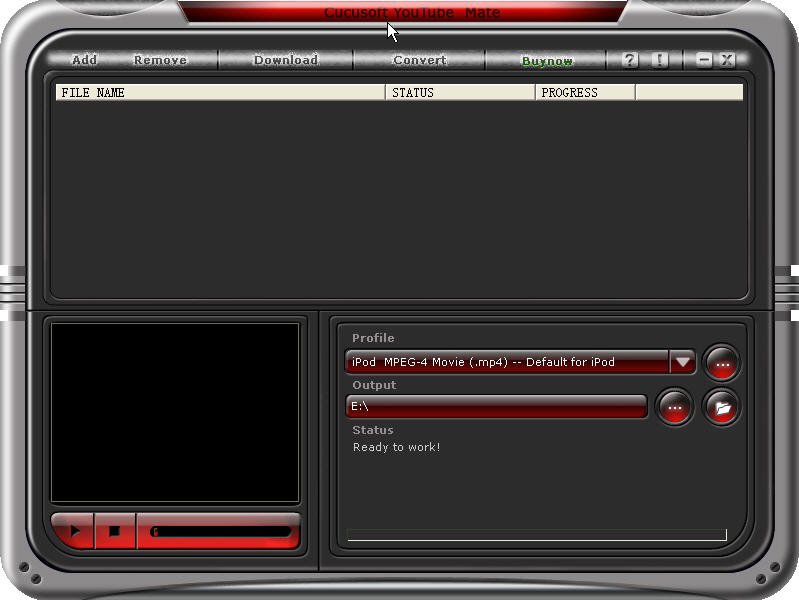
Billions of people watch YouTube videos on-line every day.But only a few of them can enjoy YouTube videos on their iPod/PSP/iPhone/Zune/Mobile phone .
Most people often have difficulties in downloading videos from YouTube and converting them to the playable formats supported by iPod/PSP/iPhone.
Now all has gone. youtube is born for the solution of the questions above.
With it you can download, convert and put videos from YouTube on your iPod/PSP/iPhone/Zune/Mobile phone easily by taking the steps as follows.
Make preparations:
1 : Download and install youtube mate
2 : Download YouTube videos.
Click the “download” button. A dialog pops up and put the video URL in the “video URL” text.
Finally click “OK” button. In a short while the video will be downloaded.
Part 1: Convert downloaded videos
(1) For iPod/ iPhone/Zune/Mobile phone
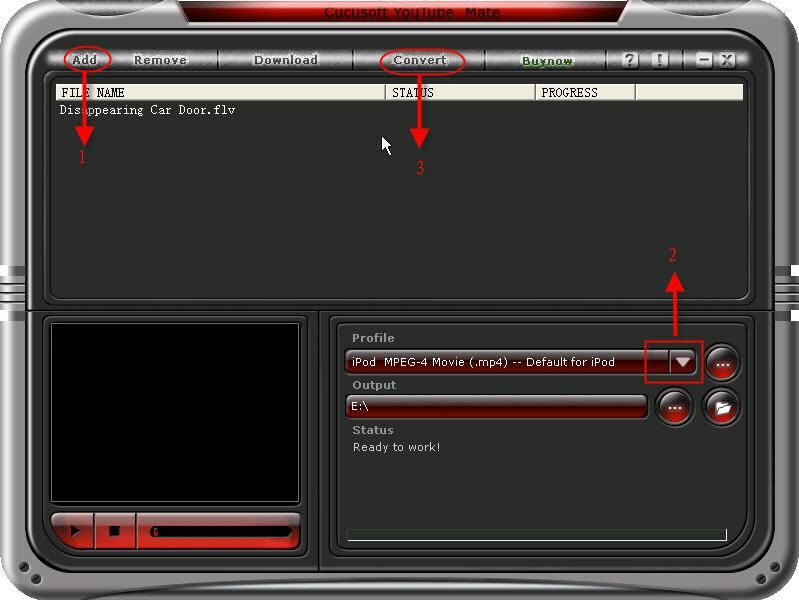
Step 1: Click the “Add” button and select the downloaded videos and Select the iPod MPEG-4 Movie for iPod or iPhone MPEG-4/H.264 Movie for iPhone from the “profile” drop-down list. In addition you can also select the formats for Zune and Mobile phone from the drop-down list.
Step 2:Click the “…”button to select the output of your videos and then click the “convert” button to start the conversion. In a short while it will be finished.
(2) For PSP
You need a special converter to convert the downloaded videos to the PSP playable videos. You can take the following steps.
Step 1:Download and install iSkysoft Video Converter
Step 2: Run the software and click “Add files” button to load videos.
Step 3: Choose PSP formats from drop-down list.
Step 4: Select the destination of video from the output drop-down list and click “Convert” button to start the conversion.
Part 2: Put the videos on iPod/PSP/iPhone .
(1) For iPod/iPhone
You can upload the videos to the iTunes and then put it onto your iPod/iPhone.
(2) For PSP
You should create a new file named MP_ROOT under the root directory and then create a file named 100MNV01 under the MP_ROOT file. Put your video in the 100MNV01 files and you can enjoy your video on PSP.
Now you can enjoy any videos downloaded from YouTube on your iPod/PSP/iPhone. Have fun!



Ever dropped your cell phone in the sink, or even worse, the toilet? Did you ever leave it in your pocket and run it through the washer? Did you ever swim with your cell phone in your pocket? It usually means you have to replace your phone, but sometimes if you're fast, you can save the phone!
Lets we solve this problem
- Get it out of the water as soon as possible. The plastic covers on cell phones are fairly tight, but water can enter the phone in a short period of time, perhaps only 20 seconds or less. So grab your phone quickly! If you can't get to it in time, your best bet is to remove the battery while it is still under water. Water helps dissipate heat from shorts that can damage the phone, so most damage occurs when the inside of the phone is merely wet and there is a power source.
- Remove the battery. This is one of the most important steps. Don't waste the time to think about it; electricity and water do not mix. Cutting power to your phone is a crucial first step in saving it. Many circuits inside the phone will survive immersion in water provided they are not attached to a power source when wet.
- Remove your SIM card. Some or all of your valuable contacts (along with other data) could be stored on your SIM. To some people this could be more worth saving than the phone itself. SIM cards survive water damage well, but some of the following steps are unnecessary i.e. don't heat it. Just pat it dry and leave it aside until you need to connect your phone to your cellular network. (This step does not apply to CDMA carriers such as Verizon, Alltel, US Cellular, Sprint, etc.)
- Dry your phone. Obviously you need to remove as much of the water as soon as possible, so you can save it from getting into the phone. Shake it out without dropping it, then use a towel or paper towel to gently remove as much of the remaining water as possible. Dry the excess moisture by hand.
- Remove any covers and external connectors to open up as many gaps, slots, and crevices in the phone as possible.
- Use a vacuum if possible. Do not use a hair dryer (even on a "cold" mode) to dry out the phone, as this may force moisture further into the small components, deep inside the phone. If moisture is driven deeper inside, corrosion and oxidation may result when minerals from liquids are deposited on the circuitry. Using a hairdryer might be a temporary fix, but this will eventually cause component failure inside the phone. Instead, remove all residual moisture by drawing it away with a vacuum cleaner held over the affected areas for up to 20 minutes in each accessible area. This is the fastest method and can completely dry out your phone and get it working in thirty minutes. Be careful not to hold the vacuum too close to the phone, as a vacuum can create static electricity, which is even worse.
- Use a substance with a high affinity for water to help draw out moisture. Leave the phone in a bowl or bag of uncooked rice overnight. The rice would absorb any remaining moisture. If available, it is preferable to use desiccant instead. Desiccant will absorb moisture better than rice. It may be found under a brand name such as "Damp Rid" or "Dry Right".
- Let the phone sit on absorbent towels, napkin, or other paper. Check the absorbent material every hour for 4 to 6 hours. If moisture is evident, repeat the vacuuming step and desiccant steps.
- Test your phone. After you have waited a day or so, make sure everything is clean and dry looking and re-attach the battery to the phone and see if it works. If your phone does not work, try plugging it into its charger without the battery, if this works, you need a new battery. If not, try taking your cell phone to an authorized dealer. Sometimes they can fix it. Don't try to hide the fact that it has been wet. There are internal indicators that prove moisture.
To find out if the phone is truly water damaged, remove that battery. In the corner near where the battery is, there SHOULD be a white square or circle, with or without red lines. If this is pink or red, your phone does in fact have water damage.
Cell-phone service seems to stubbornly resist improvement. The Annual Survey of Cell-Phone Service conducted by the Consumer Reports National Research Center found that fewer than half of respondents were completely or very satisfied. That makes cell service among the lower-rated services we survey, as it has been for the past six years.
Still, there are bright spots. Verizon and Alltel scored better than other providers this year, as they have in the past. T-Mobile matched satisfaction rates for Verizon in almost all the cities we surveyed. And T-Mobile plans generally offer more for the money than those of Verizon and Alltel.
Meanwhile, cell carriers are getting more consumer-friendly. Last fall, all of our rated service providers pledged to join Verizon and prorate their hefty $150 to $200 early-termination fees. Holdouts also said they would join Alltel and T-Mobile and end their heavy-handed practice of mandatory contract extensions when you make changes to your service plan.
Mandatory contract extensions were one of the top two complaints of survey respondents, tied with high costs for service. More than 60 percent of respondents who made changes to their cell-phone service plan in the past year said they were required to extend their contract as part of the deal. That number might understate the problem because some carriers haven't always been up front with customers about such extensions, according to allegations in recent legal filings.
In the past five years, consumer advocates such as the Foundation for Taxpayer and Consumer Rights, in Santa Monica, Calif., and class-action lawyers have filed more than 100 lawsuits coast to coast, according to an analysis by Thomson West, a legal-information-services firm. The cases involve issues such as early-termination fees, calculation of airtime, arbitration requirements, class-action prohibitions, rebates, and other contract provisions.
One important outcome was a spate of recent court decisions in several states that struck down as "unconscionable" cell-phone service contract provisions that had forced customers to arbitrate disputes individually and prohibited them from banding together into class actions. "In the last 18 months, there has been a sea change and a run of court decisions favoring consumers," says Paul Bland, staff attorney with Public Justice, a nonprofit public-interest law firm in Washington, D.C., and an expert on class-action bans in consumer contracts.
The proposed settlement in another California suit might signal new flexibility about taking your phone with you when you switch carriers. Most phones in the U.S. are locked to a specific carrier (see Wireless carriers lock out consumers). But Sprint has agreed to provide departing customers with a code that unlocks their phone, with the promise of making it usable with other compatible carriers.
Also, in late November Verizon announced that it will by the end of 2008 provide customers the option to use, on its nationwide wireless network, wireless devices, software and applications offered by other companies which meet Verizon's technical specifications. Advocates at Consumers Union, the non-profit publisher of Consumer Reports, said the news was encouraging but its full impact will not be clear until more details are available.
Congress has joined in and ratcheted up pressure on the industry with public hearings and the threat of consumer-rights legislation. "People want their cell service to work, they believe it's a necessary part of life, and they don't want to get ripped off," says Sen. Amy Klobuchar, D-Minn. Klobuchar has introduced legislation that would require prorated cell-phone service termination fees and public disclosure of the incidence of dropped calls and coverage gaps by location.
Prospects for the bill were unclear as we went to press. But a day before hearings on the legislation in October, AT&T announced that it would prorate its fees beginning in early 2008. Other carriers began easing up some restrictions last summer and fall, albeit modestly.
Despite such positive developments, you still need to take charge of fixing problems with your cell-phone service. Here are some steps to consider:
CELL PROBLEMS AND SOLUTIONS
Problem: Poor coverage. Substandard service quality was the biggest reason our survey respondents switched carriers in the previous three years, our survey found.
Solution: Listen to our readers’ experiences. Alltel and Verizon got high marks across the board for connectivity. T-Mobile had relatively high satisfaction scores, but customers experienced problems with lack of service in some cities. Subscribers also highlighted problems with AT&T for gaps in service and static, and with Sprint for dropped calls. Check the signal strength down to street level in areas where you‘ll use the phone most frequently. Interactive online coverage maps, offered by most carriers except Alltel, provide some guidance as to what you can expect.
Problem: Unsatisfactory customer service. The trouble spots include serious or persistent billing errors,maddening voice-mail menus, and the need to spend lots of time and effort yielding little help from customer service.
Solution: Again, heed the voice of experience—but don’t expect too much. In our survey, Alltel, T-Mobile, and Verizon were the better choices in a bad lot for customer service. Only about 40 percent of their customers said these companies were very helpful, responding to queries and complaints about service issues—none too impressive. But only 21 percent of Sprint customers said the same thing. Sprint made news last summer when it terminated 1,000 subscribers for complaining too much about the service. Roni Singleton, a Sprint representative, says, “They were contacting us, in some cases, 100 times per month.We tried to resolve their issues, but they were still not satisfied, and it gets to the point where you say these customers may be better off somewhere else.”
If customer service isn’t helpful, file a complaint with your state public utility commission or consumer advocate.
Problem: Early-termination fees. About one in seven survey respondents said they were seriously considering a switch to a better carrier but were discouraged from doing so by penalties that can run as high as $200 per phone line. Termination fees are especially onerous when a carrier keeps charging former customers a monthly service fee until they pony up the penalty.
It’s not clear what actual costs such fees are intended to offset. Cellular carriers variously claim that the fees are used to recoup handset and rate-plan discounts, unspecified “costs caused by early termination” and “transaction costs,” and even the capital investment in their wireless networks.
Scott Poynter, lead counsel in a classaction suit against Alltel, which is based in Arkansas, says the carrier uses those fees to "hold its customers hostage." He argues that if the fees recover real costs, why has Alltel charged the same $200 fee if the customer quits 23 days or 23 months into a 24-month contract? Alltel, which is contesting the lawsuit, declined to comment. Poynter says the carrier should shrink the fee proportionately as the contract matures. Last fall Alltel, AT&T and T-Mobile said they would join Verizon in doing just that. As we went to press, Sprint told us that it planned to announce prorated early termination fees in November.
Paul Weiss, lead counsel in class-action suits against Sprint, T-Mobile, and Verizon, says that the industry has collected several hundred million dollars in unjust penalties. “This is an enormous profit center for cell companies,” Weiss says.
Solution: Attack this problem based on your specific circumstances. If you’re near the end of your contract,wait until it runs out before quitting the company. If you’re at the very beginning of your contract, take advantage of 14- to 30-day freetrial periods offered by the carriers. They allow you to cancel a new account without penalties. After that, try to negotiate a waiver, especially if service quality has deteriorated, or you’ve moved to an area the carrier does not serve well or at all, or the company has been taken over by another carrier.
You might also consider transferring your contract to someone else by going to www.celltradeusa.com or www.cellswapper.com. For about $15 to $20, you can transfer a contract with the cell carrier’s approval. The person who takes over your phone and service becomes responsible for future payments, and you walk away. But remember, if you want to keep your current phone number, arrange that with your carrier before the transfer to avoid any potential complications.
Last, consider termination fees when choosing a company in the future. Since November 2006,Verizon has been prorating its $175 early-termination fee on its two-year contracts, but only by $5 a month. Even if you cancel the contract just days before it concludes, you’ll still be liable for at least $60. Last fall, AT&T and T-mobile announced that they would prorate their fees starting in early 2008 but had not determined by how much at press time.
Problem: Mandatory extensions. In the wake of legal actions, there’s movement on this issue, too, by some carriers. In September, the Minnesota attorney general, Lori Swanson, sued Sprint, saying that the company tacked on contract extensions of up to two years without proper disclosure or consent when customers made changes to their service plans. After that, AT&T and Verizon announced that they would join Alltel and T-Mobile in eliminating contract extensions when customers changed their plan. However, note that switching to some special promotional plans or getting a new “free” or discounted phone might still trigger a contract extension.
“In some cases, Sprint extended the contract when customers called to complain or to get new batteries or small repairs for the phone,” Swanson says. “So the allegation is consumer fraud.” Sprint denies the charges, but told Consumer Reports that it too planned to stop requiring contract extensions for plan changes. In our survey, mandatory contract extensions were most frequent among Sprint customers.
Carriers,however, still have other ways to lure you back into a contract term with offers of a sexy new phone or other inducement. Verizon, for example, sent direct-mail ads to some customers this year promising one “free” month of service worth $9.99 if they renewed their contract for another year; the fine print revealed that the supposed freebie put them back on the hook for a $175 early-termination fee.
Solution: Be vigilant. Scrutinize contract details, your monthly billing statement, and any “free” offers or promotions.
A jurisdiction-wide ban on driving while talking on a hand-held cellular phone is in place in 6 states (California, Connecticut, New Jersey, New York, Utah, and Washington) and the District of Columbia. Utah has named the offense careless driving. Under the Utah law, no one commits an offense when speaking on a cellphone unless they are also committing some other moving violation other than speeding.
The law in 6 states (Illinois, Massachusetts, Michigan, New Mexico, Ohio, and Pennsylvania) specifically authorizes a locality to ban cellphone use. Localities in other states may not need specific statutory authority to ban cellphones. Localities that have enacted restrictions on cellphone use include: Chicago, IL; Brookline, MA; Detroit, MI; Santa Fe, NM; Brooklyn, North Olmstead and Walton Hills, OH; Conshohocken, Lebanon and West Conshohocken, PA; and Waupaca County, WI.
Localities are prohibited from banning cellphone use in 8 states (Florida, Kentucky, Louisiana, Mississippi, Nevada, Oklahoma, Oregon, and Utah).
The use of all cellular phones while driving a school bus is prohibited in 17 states and the District of Columbia.
The use of all cellular phones by novice drivers is restricted in 17 states and the District of Columbia. Louisiana has passed a law restricting teen use of cellphones, but as of this writing, it is not clear whether it bans all cellphone use or use of hand-held cellphones.
Text messaging is banned for all drivers in 7 states (Alaska, California, Connecticut, Louisiana, Minnesota, New Jersey, and Washington) and the District of Columbia. In addition, novice drivers are banned from texting in 9 states (Delaware, Maine, Maryland, Nebraska, North Carolina, Oregon, Texas, Virginia, and West Virginia) and school bus drivers are banned from text messaging in 4 states (Arkansas, North Carolina, Texas, and Virginia).
The table below shows the states that have cell phone laws, whether they specifically ban text messaging, and whether they are enforced as primary or secondary laws. Under secondary laws, an officer must have some other reason to stop a vehicle before citing a driver for using a cellphone. Laws without this restriction are called primary. California and Utah have unusual provisions noted below. Read More...
Dr Martin Cooper, a former general manager for the systems division at Motorola, is considered the inventor of the first portable handset and the first person to make a call on a portable cell phone in April 1973. The first call he made was to his rival, Joel Engel, Bell Labs head of research.
AT&T's research arm, Bell Laboratories, introduced the idea of cellular communications in 1947. But Motorola and Bell Labs in the sixties and early seventies were in a race to incorporate the technology into portable devices.
Cooper, now 70, wanted people to be able to carry their phones with them anywhere.
While he was a project manager at Motorola in 1973, Cooper set up a base station in New York with the first working prototype of a cellular telephone, the Motorola Dyna-Tac. After some initial testing in Washington for the F.C.C., Mr. Cooper and Motorola took the phone technology to New York to show the public.
Cell Phone Popcorn Hoax Revealed. - The most amazing home videos are here
Everybody know that the cell phone making popcorn video it's a big Hoax and i will show you how it's done.
Disclaimer: CAUTION! As you know...microwave can be dangerous. Never point them at any living object! This is not a toy, and this should not be used like a conventional microwave. In other words, don't allow children to use it. It should only be operated by responsible persons who understand and respect the potential microwave safety hazards.
You are an Idiot
Can you pop corn with a cell phone?
Plenty of people were fooled into believing they could, though, after watching a video showing cell phones popping corn on the Internet ...
Truth is, the whole thing was a hoax. Cardo Systems, a wireless headset manufacturer, created and distributed the videos as a viral marketing campaign. But as pointed out in Slate, the effect of this clever (or insidious, depending on your point of view) advertisement was to tap into people's fears about cell-phone safety: If it can cook popcorn, so the idea goes, what might it be doing to our brains?
Still, we wonder: How'd they get the corn to pop in the video?
Here's how: Once the cell phones started ringing, the video makers dropped popped kernels into the center of the table, between the phones. They later digitally removed the unpopped kernels you see early in the video, thereby creating the illusion that your cell phone can double as a Jiffy Pop.
Cell-phone service seems to stubbornly resist improvement. The Annual Survey of Cell-Phone Service conducted by the Consumer Reports National Research Center found that fewer than half of respondents were completely or very satisfied with their service. That makes cell service among the lower-rated services we survey, as it has been for the past six years.
S till, there are bright spots. Verizon and Alltel scored better than other providers this year, as they have in the past. T-Mobile matched satisfaction rates for Verizon in almost all the cities we surveyed. And T-Mobile plans generally offer more for the money than those of Verizon and Alltel.
Meanwhile, cell carriers are getting more consumer-friendly. Last fall, all of our rated service providers pledged to join Verizon and prorate their hefty $150 to $200 early-termination fees. Holdouts also said they would join Alltel and T-Mobile and end their heavy-handed practice of mandatory contract extensions when you make changes to your service plan.
Cell Phone Batteries, Adapters, Chargers for the Motorola 76090WARSA Cell Phone are specifically designed for each brand and model. Apex Battery offers a complete line of non-OEM, compatible Cell Phone Batteries, Adapters, Chargers for the Motorola 76090WARSA Cell Phone. All of our products come with a 12 month warranty and a 100% satisfaction guarantee.Regular price: $31.99
A full QWERTY keyboard can be found on the front of the device that also has a touch-sensitive navigation wheel around the D-pad to help you navigate the menu more smoothly. The camera is 2 megapixel type that is fairly small, but the device is primarily a business type device camera is not really the subject here. 110 MB of internal memory can be found on the device which can be supplemented with an SD card up to 8 GB of capacity. Nokia E63 runs the Symbian 9.2 S60 V 3.2.
The Nokia E63 is a quad band 3G which all standards of connectivity you need for a phone that includes GPRS, EDGE, Wi-Fi and Bluetooth. Curiously they also include Infra-red that we have not seen for some time on the another The phone measures 113 x 59 x 13 mm making it shorter 1 mm, 2 mm wider and thinner than 3 mm while it is brother E71. It weighs less than 2 grams, the E71 could be with him to be thin, but the E63 has a plastic rather than metal one.
VoIP gives businesses the ability to send and receive phone calls over a broadband connection using Ethernet / network cable. VoIP phone service is generally cheaper than traditional phone service options. Thanks to VoIP phones, making VoIP phones calls is nearly identical to making phone calls using a landline service. The 7961G is a full-featured, enhanced manager IP phone. It provides six programmable backlit line/feature buttons and four interactive soft keys that guide a user through call features and functions. There are audio controls for the high-quality duplex speakerphone, handset, and headset. The phone also features a best-of-class large, higher-resolution grayscale pixel-based LCD. The display provides features such as date and time, calling party name, calling party number, and digits dialed. The crisp graphic capability of the display allows for the inclusion of higher value, more visibly rich Extensible Markup Language (XML) applications and double-byte languages. The phone measures 10.5 x 6 x 8 inches (WDH) and weighs 3.5 pounds. Some features of the 7961G include a keypad, speakerphone, menu operation, volume and ringer control, 3-way calling capability, and upgradeable firmware. The IP features include an integrated Ethernet switch, Power over the Ethernet (PoE) support, SCCP Protocol The price of VoIP technology can be expensive. The good news is that VoIP phones, such as the 7961G can be purchased as used or refurbished
Voice over internet protocol (VoIP) technology has given businesses a way to save money on phone calls without compromising their ability to communicate. Cisco, a leading manufacturer for VoIP phones, offers the 7961G Unified IP phone amongst others in their product line.
Where the Cisco 7961G might sell for $300+ new, Cisco 7961G can be found for $100+ less than retail (used phones). They often come with a 1-year manufacturer warranty as well. This means even more savings and peace-of-mind for the consumer.
Written by Eric Higgins
About Me

